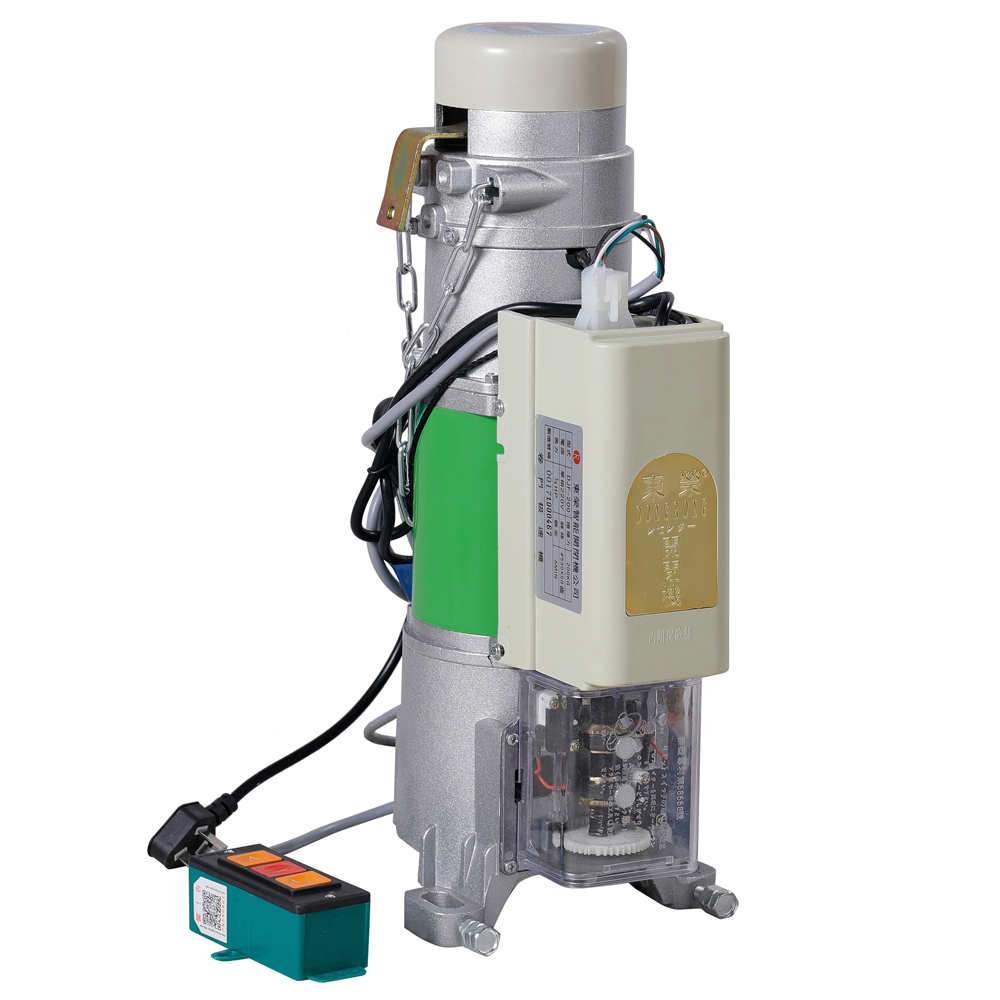
A comprehensive diagnostic manual based on 20+ years of field experience from Dongrong Motor engineering team
Introduction: Why Professional Troubleshooting Matters
Roller door motors are the heart of modern commercial and industrial access control systems. When they malfunction, operations can grind to a halt—costing businesses time, money, and security. At Dongrong Motor, with over two decades of manufacturing excellence and ISO 9001 certification, we've encountered virtually every roller shutter motor issue imaginable.
This guide consolidates our engineering expertise into actionable troubleshooting steps. Whether you're a maintenance technician, facility manager, or DIY enthusiast, these diagnostic procedures will help you identify and resolve common roller door motor problems efficiently.
Note: Always disconnect power before performing electrical diagnostics. If unsure, consult a certified technician.
Common Problem #1: Motor Won't Run at All
Symptoms
- No response when pressing remote or wall button
- No audible click from control board
- LED indicators on control box are off or flashing error codes
Diagnostic Steps
| Check | Procedure | Expected Result |
|---|---|---|
| Power Supply | Test voltage at terminal block | 220-240V AC (±10%) |
| Fuse Status | Inspect control board fuse | Continuity present |
| Circuit Breaker | Check building electrical panel | Breaker in ON position |
| Wiring Connections | Inspect terminal block screws | All connections tight |
Root Causes & Solutions
A. Power Supply Issues
- Test: Use a multimeter to measure voltage at the motor terminal block
- Fix: Contact electrician if voltage is outside 198-264V range
- Dongrong Motor Tip: Our AC600 series includes built-in voltage protection (±15% tolerance)
B. Control Board Failure
- Symptoms: Burnt smell, visible scorch marks, swollen capacitors
- Fix: Replace control board (part #DR-CB-AC600)
- Prevention: Install surge protector; Dongrong motors include SPD protection as standard
C. Thermal Cutoff Triggered
- Cause: Repeated operation in high ambient temperatures (>40°C)
- Solution: Allow 15-30 minutes cooling period
- Upgrade: Consider Dongrong's thermal-protected motors with auto-reset function
Common Problem #2: Motor Runs But Door Doesn't Move
Symptoms
- Motor hums or runs but door remains stationary
- Grinding noise from motor gearbox
- Motor runs in one direction only
Diagnostic Procedure
Step 1: Mechanical Inspection
- Disconnect power and engage manual release
- Check if door can be moved manually
- Inspect drive chain/belt for breaks or excessive slack
- Examine sprocket engagement with door shaft
Step 2: Clutch Assessment
| Clutch Type | Test Method | Normal Reading |
|---|---|---|
| Mechanical | Torque wrench on output shaft | 15-25 Nm slip torque |
| Electronic | Controller diagnostics | Current <150% rated |
Step 3: Limit Switch Verification
- Upper limit: Door should stop 50-100mm from fully open
- Lower limit: Door should stop flush with floor
- Adjustment: Turn limit screws clockwise to reduce travel
Expert Solutions
Chain/Belt Drive Issues
- Tension: 10-15mm deflection at mid-span
- Alignment: Sprockets within 2mm parallel tolerance
- Replacement: Use Dongrong genuine parts for warranty compliance
Clutch Overload
- Reset procedure varies by model:
- AC300: Manual reset button on gearbox - AC600: Auto-reset (wait 60 seconds) - AC1000: Electronic reset via controller
Common Problem #3: Remote Control Not Working
Quick Troubleshooting Flowchart
Remote LED lights?
├── NO → Replace battery (CR2032, 3V)
│         └─ Still no light? Replace remote
│
└── YES → Wall button works?
          ├── NO → Check motor control board
          └── YES → Programming issue
                     └─ Re-pair remote (see below)
Remote Re-Pairing Procedure (Dongrong AC Series)
- Press and hold LEARN button on control board (3 seconds)
- LED will illuminate steadily
- Press desired button on remote within 10 seconds
- LED flashes 3 times = successful pairing
- Test remote operation
Advanced Remote Diagnostics
| Frequency | Dongrong Models | Interference Sources |
|---|---|---|
| 433.92 MHz | AC300, AC400 | WiFi routers, baby monitors |
| 868.3 MHz | AC600, AC800 | Alarm systems, smart home devices |
| 2.4 GHz | AC1000 Smart | WiFi, Bluetooth, microwave ovens |
Range Optimization Tips:
- Replace antenna if damaged (part #DR-ANT-433)
- Clear line of sight between remote and motor
- For metal buildings: Install external receiver (DR-RX-EXT)
Common Problem #4: Door Reverses Immediately or Mid-Travel
Understanding Safety Systems
Modern roller door motors incorporate multiple safety mechanisms:
- Obstruction Detection: Current sensing (150% threshold)
- Photo Eyes: Infrared beam interruption
- Edge Sensors: Contact strips on door bottom
Diagnostic Checklist
Obstruction Detection Calibration
- Place 50mm block under door center
- Close door - should reverse on contact
- If not reversing: Increase sensitivity (turn potentiometer CW)
- If reversing without obstruction: Decrease sensitivity (CCW)
Photo Eye Alignment
- LED status on both emitter and receiver should be solid green
- Flashing amber: Misalignment or obstruction
- Red: Wiring fault or damaged sensor
- Alignment procedure: Loosen mounts, adjust until both LEDs green
Force Settings by Door Size
| Door Width | Closing Force | Opening Force |
|---|---|---|
| <3m | 50% | 60% |
| 3-5m | 70% | 75% |
| >5m | 85% | 90% |
Safety Warning: Never set force above 100%. This bypasses safety protection and may cause injury.
Common Problem #5: Excessive Noise During Operation
Noise Classification & Diagnosis
| Noise Type | Likely Source | Urgency |
|---|---|---|
| Grinding/Metal-on-metal | Worn gearbox bearings | High - Schedule repair |
| Squeaking | Dry chain/bearings | Medium - Lubricate |
| Rattling | Loose hardware | Low - Tighten |
| Electrical hum | Normal operation | None - Expected |
Dongrong Motor Noise Specifications
| Model | Rated dB(A) | Measured at |
|---|---|---|
| AC300-Silent | ≤45 dB | 1m distance |
| AC600 | ≤52 dB | 1m distance |
| AC800-Industrial | ≤58 dB | 1m distance |
| AC1000-Heavy | ≤62 dB | 1m distance |
Noise Reduction Solutions
1. Lubrication Schedule
- Chain drive: Every 6 months (ISO VG100 oil)
- Bearings: Every 12 months (lithium grease)
- Rail guides: Every 3 months (silicone spray)
2. Vibration Dampening
- Install rubber isolation mounts between motor and structure
- Check mounting bolts torque: 25-30 Nm
- Consider upgrading to AC300-Silent for noise-sensitive environments
3. Chain Tension Optimization
- Too tight: Increases bearing load and noise
- Too loose: Chain slap and premature wear
- Target: 10-15mm mid-span deflection under 5kg load
Common Problem #6: Door Stops Before Fully Open or Closed
Limit Switch Fundamentals
Dongrong motors use magnetic or mechanical limit switches to define door travel endpoints. Proper adjustment ensures:
- Full opening for vehicle clearance
- Complete closing for security and weather sealing
- Prevention of motor strain from over-travel
Limit Adjustment Procedure
Mechanical Limit Switches (AC300/AC400)
- Remove limit cover (4 screws)
- Locate UP and DOWN adjustment screws
- Increase travel: Turn screw clockwise
- Decrease travel: Turn screw counter-clockwise
- One full turn = approximately 50mm door movement
- Test and fine-tune
Electronic Limits (AC600+)
- Enter programming mode: Hold SET + UP for 3 seconds
- Display shows "LIM"
- Press UP/DOWN to adjust open position
- Press SET to confirm
- Repeat for close position
Common Limit Switch Failures
| Symptom | Cause | Solution |
|---|---|---|
| Door drifts from set position | Worn limit switch | Replace switch assembly |
| Erratic stopping | Loose cam/magnet | Tighten set screws |
| Limits not saving | Control board fault | Replace control board |
Common Problem #7: Motor Overheating and Shutdown
Thermal Protection System
Dongrong motors incorporate Class F insulation (155°C rating) with thermal cutoffs at:
- Standard models: 125°C winding temperature
- High-duty models: 140°C with external cooling fan
Duty Cycle Guidelines
| Application | Max Cycles/Hour | Cooling Period |
|---|---|---|
| Residential | 20 | 30 min continuous |
| Commercial | 45 | 15 min continuous |
| Industrial | 80 | 10 min continuous |
Important: Exceeding duty cycle causes accelerated wear and voids warranty.
Overheating Causes & Solutions
Environmental Factors
- Ambient temperature >40°C: Add ventilation or shading
- Direct sunlight: Install motor cover (DR-COVER-UV)
- Enclosed space: Ensure minimum 100mm clearance around motor
Operational Factors
- Stalled door: Check for obstructions, lubricate
- Undersized motor: Verify torque requirements (see sizing chart below)
- Frequent cycling: Upgrade to high-duty cycle model
Motor Sizing Reference
| Door Size (W×H) | Weight | Recommended Model | Torque |
|---|---|---|---|
| 3m × 3m | <80kg | AC300 | 20Nm |
| 4m × 4m | <120kg | AC600 | 50Nm |
| 5m × 5m | <180kg | AC800 | 80Nm |
| 6m × 6m | <250kg | AC1000 | 120Nm |
Common Problem #8: Battery Backup Not Functioning
Battery System Diagnostics
Dongrong optional battery backup (DR-BB-24V) provides emergency operation during power outages.
Battery Health Check
- Disconnect AC power
- Press wall button - motor should run on battery
- If no operation: Check battery voltage (>24VDC required)
- If voltage low: Replace battery (2×12V 7Ah SLA)
Charging System Test
- Reconnect AC power
- Measure battery voltage (should be 27.6V charging)
- Check charging LED on control board (steady green)
- Allow 24 hours for full charge cycle
Battery Replacement Schedule
| Usage Pattern | Replacement Interval |
|---|---|
| Standby only (rare outages) | 3-4 years |
| Regular testing | 2-3 years |
| Frequent power outages | 1-2 years |
Replacement Procedure:
- Disconnect AC power and battery fuse
- Remove old batteries (note polarity!)
- Install new batteries: Red (+) Black (-)
- Replace fuse, restore power
- Test emergency operation
Common Problem #9: Intermittent Operation / Random Stops
Intermittent Fault Diagnosis
Intermittent issues are challenging because they disappear during testing. Systematic logging helps identify patterns:
Logging Template
Date/Time: _______
Operation: Open / Close / Stop
Weather: _______
Temperature: _______
Frequency of issue: _______
Error codes displayed: _______
Common Intermittent Causes
| Pattern | Likely Cause | Investigation |
|---|---|---|
| Only in morning | Condensation in control box | Check IP rating, seal integrity |
| Hot days only | Thermal expansion of components | Monitor motor temperature |
| After rain | Water ingress | Inspect seals, drainage |
| Random times | Loose connection | Wiggle test on all terminals |
Vibration-Related Faults
Loose connections worsen with motor vibration:
- Power off and lock out
- Check all terminal block screws (torque: 1.5-2.0 Nm)
- Inspect crimp connections for corrosion
- Verify earth bonding integrity
- Apply thread-locking compound to critical fasteners
Common Problem #10: Slow Operation Speed
Speed Specification Reference
| Model | Normal Speed | Slow Speed Setting |
|---|---|---|
| AC300 | 12 rpm | 6 rpm (50% mode) |
| AC600 | 14 rpm | 7 rpm (50% mode) |
| AC800 | 10 rpm | 5 rpm (50% mode) |
Speed Reduction Causes
Mechanical Drag
- Worn or dry bearings
- Misaligned tracks
- Damaged door curtain
- Debris in guides
Electrical Issues
- Low supply voltage
- Weak capacitor (single-phase motors)
- Incorrect speed setting on controller
Speed Optimization
1. Mechanical Inspection
- Lubricate all moving parts
- Check track alignment (±2mm/m)
- Verify door balance: Should stay at any position when released
2. Electrical Verification
- Test supply voltage under load
- Check start/run capacitor (±10% of rated μF)
- Review controller speed settings
3. Upgrade Options
- Variable speed drives (AC600-VFD)
- Higher torque models for heavy doors
- Smart controllers with adaptive speed control
Common Problem #11: Door Reverses on Closing (Obstruction Error)
False Trigger Diagnosis
When the door reverses without visible obstruction, several factors may trigger the safety system:
Current Sensitivity Analysis
- Normal closing current: 80-120% of rated
- Obstruction trigger: 150% of rated
- Binding door sections can cause false triggers
Track Alignment Check
- Measure track spacing at top, middle, bottom
- Should be consistent within 2mm
- Check for vertical plumb (±3mm/m)
- Verify track fasteners are tight
Adjustment Procedures
Force Setting Adjustment (AC600+)
- Enter service mode: Hold UP + DOWN for 5 seconds
- Navigate to "FORCE" menu
- Increase closing force by 5% increments
- Test after each adjustment
- Never exceed 100%
Photo Eye Sensitivity
- Some models allow sensitivity adjustment
- Weather conditions (fog, bright sun) can affect beam
- Consider weather shields (DR-WS-PE) for outdoor installations
Common Problem #12: Complete System Failure (No Response)
Systematic Recovery Procedure
When all troubleshooting has failed, follow this systematic reset:
Step 1: Master Reset
- Disconnect AC power for 60 seconds
- Disconnect battery (if fitted)
- Press all control buttons to discharge capacitors
- Reconnect power
- Test basic operation
Step 2: Factory Reset (AC600+ Controllers)
- Power off
- Hold SET button while powering on
- Hold for 10 seconds until LED flashes
- Release SET button
- Reconfigure all settings and remotes
Step 3: Component Isolation
- Disconnect all accessories (sensors, keypads)
- Test motor-only operation
- Reconnect accessories one by one
- Identify faulty component
Step 4: Professional Assessment If problems persist after reset:
- Contact Dongrong technical support
- Prepare documentation: Model, serial number, error codes
- Consider control board replacement
FAQ: Roller Door Motor Troubleshooting
Q1: How often should I perform preventive maintenance?
A: We recommend quarterly inspections for commercial use and bi-annual for residential. Critical checks include lubrication, fastener torque, and safety system testing.
Q2: Can I repair the motor gearbox myself?
A: Gearbox repair requires specialized tools and expertise. Opening the gearbox voids the warranty. Contact Dongrong authorized service centers for gearbox issues.
Q3: Why does my motor run but the door doesn't move even with the clutch engaged?
A: Check the drive chain/belt connection to the door shaft. The clutch may be slipping due to overload. Verify door balance—an unbalanced door can exceed motor torque capacity.
Q4: How do I know if my motor is undersized?
A: Signs include: slow operation, frequent overheating, inability to lift door from stopped position, and premature failure. Use our sizing chart above or contact Dongrong for load calculation assistance.
Q5: What's the average lifespan of a roller door motor?
A: With proper maintenance, Dongrong motors typically last 10-15 years in residential applications and 7-10 years in commercial/industrial settings. Duty cycle and environmental conditions significantly impact longevity.
Q6: Can I upgrade my existing motor to add smart features?
A: Yes, Dongrong offers retrofit smart controller kits (DR-SMART-RETRO) compatible with most AC series motors manufactured after 2015. Features include smartphone control, scheduling, and activity logging.
Q7: What safety certifications should I look for?
A: Look for CE marking (European safety), ISO 9001 (quality management), and local electrical safety certifications. Dongrong motors carry CE, ISO 9001, and meet IEC 60335 safety standards.
Q8: Why is my new motor making a clicking sound?
A: A rhythmic clicking during operation usually indicates mechanical interference. Check for: loose chain hitting cover, foreign object in gearbox, or improperly installed limit switch cam. This is not normal—investigate immediately.
Preventive Maintenance Schedule
Monthly Checks
- [ ] Visual inspection of all components
- [ ] Test safety reverse function
- [ ] Check remote battery level
- [ ] Listen for unusual noises
Quarterly Tasks
- [ ] Lubricate chain drive
- [ ] Inspect and tighten all fasteners
- [ ] Clean photo eye lenses
- [ ] Test manual release mechanism
- [ ] Check weather seals
Annual Service
- [ ] Professional inspection
- [ ] Gearbox oil check/replacement
- [ ] Electrical connection inspection
- [ ] Full safety system certification
- [ ] Update firmware (smart models)
Conclusion: When to Call a Professional
While this guide covers common roller door motor issues, some situations require professional expertise:
- Electrical faults beyond basic connections
- Gearbox rebuilds or internal repairs
- Structural issues with door or guides
- Warranty work (unauthorized repairs void coverage)
Dongrong Motor Support
Our global service network provides:
- Technical hotline: 24/7 emergency support
- Video diagnosis: Remote troubleshooting assistance
- On-site service: Authorized technicians worldwide
- Genuine parts: Factory-original replacement components
Contact our technical team:
- Email: [email protected]
- Website: www.dongrongmotor.com/support
Related Articles
- How to Choose the Right Roller Door Motor: Complete Sizing Guide
- Professional Installation Guide for Roller Shutter Motors
- Dongrong AC600 vs AC800: Product Comparison and Review
- Roller Door Motor Safety Standards: Understanding CE and ISO Certifications
- Smart Gate Automation: Integrating Roller Doors with Home Systems
This troubleshooting guide is based on Dongrong Motor's 20+ years of manufacturing expertise and field service data. For model-specific documentation, refer to your product manual or contact our technical support team.
About Dongrong Motor: A leading manufacturer of roller door motors and gate automation systems, certified to ISO 9001 and CE standards, serving customers in over 50 countries worldwide.
Document Information:
- Version: 3.2
- Last Updated: February 2026
- Applicable Models: AC300, AC400, AC600, AC800, AC1000 series
- Document ID: DR-TROUBLE-2026-02